问题1:只能收到APP在线时推送的消息,离线消息收不到
问题2:一台设备一天只能收到2次消息推送
解决方法:
1、uniapp 要正确获取clientId,并且APP要获取通知权限
bindPushCid() {
           var timer = setTimeout(function() {
                plus.push.getClientInfoAsync(function(info) {
                    if (info.clientid) {
                        // 绑定到后台用户
                        updateGetuiClientId(info.clientid);
                        clearInterval(timer);
                    }
                }, function(e) {
                    console.log(JSON.stringify(e));
                })
            }, 1000)
        },
permissionPush(){
let platform = uni.getSystemInfoSync().platform
if (platform == 'android') {
/* 获取当前手机是否有通知权限 */
// let main = plus.android.runtimeMainActivity();
// let pkName = main.getPackageName();
// console.log("是否有通知权限pkName",pkName);
// let NotificationManagerCompat = plus.android.importClass("android.support.v4.app.NotificationManagerCompat");
// console.log("是否有通知权限NotificationManagerCompat",NotificationManagerCompat);
// let packageNames = NotificationManagerCompat.from(main);
var main = plus.android.runtimeMainActivity();
var NotificationManagerCompat = plus.android.importClass("androidx.core.app.NotificationManagerCompat");
let packageNames = NotificationManagerCompat.from(main);
let pkName = main.getPackageName();
if (!packageNames.areNotificationsEnabled()) { //手机没有开启通知的权限
uni.showModal({
title: '通知权限',
content: '通知权限暂未开启',
cancelText: '暂不开启',
confirmText: '前往开启',
success: function (res) {
if (res.confirm) {
let uid = main.getApplicationInfo().plusGetAttribute("uid");
let Intent = plus.android.importClass('android.content.Intent');
let Build = plus.android.importClass("android.os.Build");
let intent = '';
//android 8.0引导
if (Build.VERSION.SDK_INT >= 26) {
intent = new Intent('android.settings.APP_NOTIFICATION_SETTINGS');
intent.putExtra('android.provider.extra.APP_PACKAGE', pkName);
} else if (Build.VERSION.SDK_INT >= 21) { //android 5.0-7.0
intent = new Intent('android.settings.APP_NOTIFICATION_SETTINGS');
intent.putExtra("app_package", pkName);
intent.putExtra("app_uid", uid);
} else { //(<21)其他--跳转到该应用管理的详情页
let Settings = plus.android.importClass("android.provider.Settings");
let Uri = plus.android.importClass("android.net.Uri");
intent = new Intent();
intent.setAction(Settings.ACTION_APPLICATION_DETAILS_SETTINGS);
let uri = Uri.fromParts("package", main.getPackageName(), null);
intent.setData(uri);
}
// 跳转到该应用的系统通知设置页
main.startActivity(intent);
} else if (res.cancel) {
console.log('用户点击取消');
}
},
fail: () => {},
complete: () => {}
});
}
}
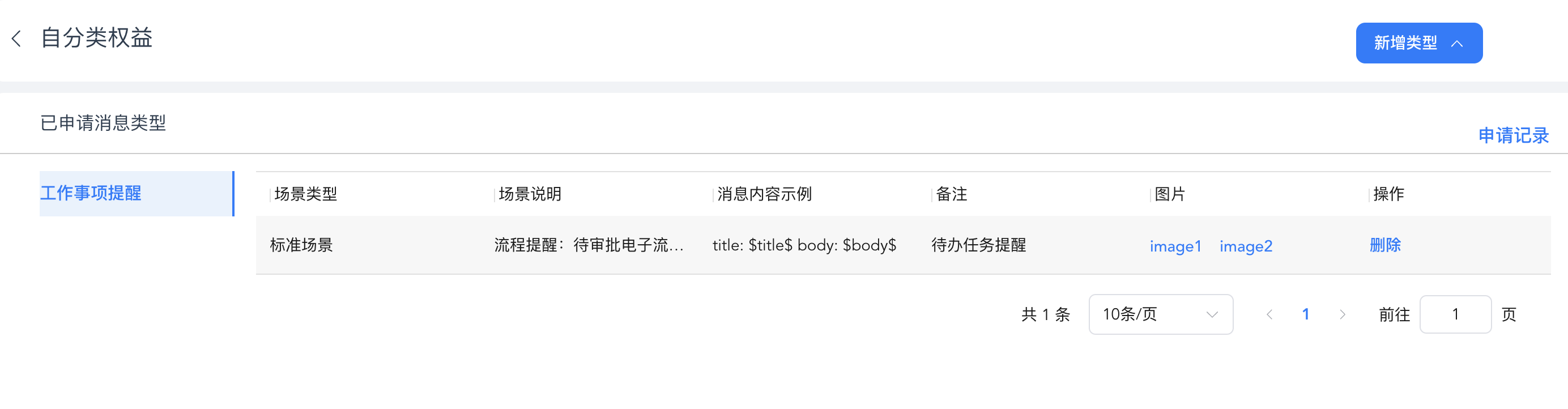
}2、华为开发者后台,申请“自分类权益”,以便解除通知条数限制,现在申请很简单,提交示例和截图,系统直接审核通过
3、厂家参数要注意细节
因为importance和category参数,调试很久
        Map<String, Map<String, Object>> options = new HashMap<>();
        Map<String, Object> oop = new HashMap<>();
        oop.put("/message/android/notification/badge/class", "io.dcloud.PandoraEntry");
        oop.put("/message/android/notification/badge/add_num", 1);
        oop.put("/message/android/notification/importance", "NORMAL");
        oop.put("/message/android/category", "WORK");
        options.put("HW", oop);
        ups.setOptions(options);
4、服务端完整代码
package com.budwk.app;

import com.getui.push.v2.sdk.ApiHelper;
import com.getui.push.v2.sdk.GtApiConfiguration;
import com.getui.push.v2.sdk.api.PushApi;
import com.getui.push.v2.sdk.common.ApiResult;
import com.getui.push.v2.sdk.dto.CommonEnum;
import com.getui.push.v2.sdk.dto.req.Audience;
import com.getui.push.v2.sdk.dto.req.AudienceDTO;
import com.getui.push.v2.sdk.dto.req.message.PushChannel;
import com.getui.push.v2.sdk.dto.req.message.PushDTO;
import com.getui.push.v2.sdk.dto.req.message.PushMessage;
import com.getui.push.v2.sdk.dto.req.message.android.AndroidDTO;
import com.getui.push.v2.sdk.dto.req.message.android.GTNotification;
import com.getui.push.v2.sdk.dto.req.message.android.ThirdNotification;
import com.getui.push.v2.sdk.dto.req.message.android.Ups;
import com.getui.push.v2.sdk.dto.req.message.harmony.HarmonyDTO;
import com.getui.push.v2.sdk.dto.req.message.harmony.HarmonyNotification;
import com.getui.push.v2.sdk.dto.res.TaskIdDTO;
import com.gexin.rp.sdk.base.IPushResult;
import com.gexin.rp.sdk.base.impl.AppMessage;
import com.gexin.rp.sdk.base.impl.ListMessage;
import com.gexin.rp.sdk.base.impl.SingleMessage;
import com.gexin.rp.sdk.base.impl.Target;
import com.gexin.rp.sdk.exceptions.RequestException;
import com.gexin.rp.sdk.http.IGtPush;
import com.gexin.rp.sdk.template.*;
import com.gexin.rp.sdk.template.style.Style0;
import lombok.extern.slf4j.Slf4j;
import org.nutz.json.Json;

import java.util.ArrayList;
import java.util.HashMap;
import java.util.List;
import java.util.Map;

@Slf4j
public class GeTuiUtil {

    private static String appId;
    private static String appKey;
    private static String masterSecret;
    private static String host;
    private static Long OfflineExpireTime;
    private static String logo;
    private static boolean isRing;
    private static boolean isVibrate;
    private static boolean isClearable;
    private static int transmissionType;

    private static PushApi pushApi;

    // 初始化个推的系统app参数
    static {
        appId = "";
        appKey = "";
        masterSecret = "";
        host = "http://sdk.open.api.igexin.com/apiex.htm";
        OfflineExpireTime = 259200000L;
        logo = "icon.png";
        isRing = true;
        isVibrate = true;
        isClearable =true;
        transmissionType = 1;

        System.setProperty("http.maxConnections", "200");
        GtApiConfiguration apiConfiguration = new GtApiConfiguration();
        //填写应用配置
        apiConfiguration.setAppId(appId);
        apiConfiguration.setAppKey(appKey);
        apiConfiguration.setMasterSecret(masterSecret);
        // 接口调用前缀,请查看文档: 接口调用规范 -> 接口前缀
        apiConfiguration.setDomain("https://restapi.getui.com/v2/");
        // 实例化ApiHelper对象,用于创建接口对象
        ApiHelper apiHelper = ApiHelper.build(apiConfiguration);
        // 创建对象,建议复用。目前有PushApi、StatisticApi、UserApi
        pushApi = apiHelper.creatApi(PushApi.class);

    }

    public static Map<String, Object> sendSingleNew(String title, String content, String cid) {
        PushDTO<Audience> pushDTO = new PushDTO<Audience>();
        pushDTO.setRequestId(System.currentTimeMillis() + "");

        buildPushMessage(title, content, pushDTO);

        Audience audience = new Audience();
        pushDTO.setAudience(audience);
        audience.addCid(cid);
        ApiResult<Map<String, Map<String, String>>> apiResult = pushApi.pushToSingleByCid(pushDTO);
        log.info("sendSingleNew result :" + Json.toJson(apiResult));
        Map<String, Object> result = new HashMap<>();
        result.put("code", apiResult.getCode());
        if (apiResult.isSuccess()) {
            result.put("data", apiResult.getData());
        } else {
            result.put("msg", apiResult.getMsg());
        }
        return result;
    }

    public static void main(String[] args) {
        String title = "你有新的待办任务";
        String content = "任务内容:测" + System.currentTimeMillis();
        String cid = "77336b3d6d136da0cf56e288a7462949";
        Map<String, Object> stringObjectMap = sendSingleNew(title, content, cid);

//        List<String> cids = new ArrayList<>();
//        cids.add(cid);
//        Map<String, Object> stringObjectMap = sendBatchNew(title, content, cids);

//        Map<String, Object> stringObjectMap = sendAllClientNew(title, content);
//
    }

    private static PushMessage buildPushMessage(String title, String content, PushDTO pushDTO) {

        PushMessage pushMessage = new PushMessage();
        pushDTO.setPushMessage(pushMessage);
        GTNotification notification = new GTNotification();
        pushMessage.setNotification(notification);
        notification.setTitle(title);
        notification.setBody(content);
        notification.setBadgeAddNum("1");
        notification.setClickType(CommonEnum.ClickTypeEnum.TYPE_STARTAPP.type);
        notification.setSlotType("2");
        notification.setCategory("CATEGORY_REMINDER");

        PushChannel pushChannel = new PushChannel();
        pushDTO.setPushChannel(pushChannel);

        AndroidDTO androidDTO = new AndroidDTO();
        pushChannel.setAndroid(androidDTO);
        Ups ups = new Ups();
        androidDTO.setUps(ups);
        ThirdNotification thirdNotification = new ThirdNotification();
        ups.setNotification(thirdNotification);
        thirdNotification.setTitle(title);
        thirdNotification.setBody(content);
        thirdNotification.setClickType(CommonEnum.ClickTypeEnum.TYPE_STARTAPP.type);

        Map<String, Map<String, Object>> options = new HashMap<>();
        Map<String, Object> oop = new HashMap<>();
        oop.put("/message/android/notification/badge/class", "io.dcloud.PandoraEntry");
        oop.put("/message/android/notification/badge/add_num", 1);
        oop.put("/message/android/notification/importance", "NORMAL");
        oop.put("/message/android/category", "WORK");
        options.put("HW", oop);
        ups.setOptions(options);

        HarmonyDTO harmonyDTO = new HarmonyDTO();
        pushChannel.setHarmony(harmonyDTO);
        HarmonyNotification harmonyNotification = new HarmonyNotification();
        harmonyDTO.setNotification(harmonyNotification);
        harmonyNotification.setTitle(title);
        harmonyNotification.setBody(content);
        harmonyNotification.setCategory("CATEGORY_REMINDER");
        harmonyNotification.setClickType(CommonEnum.ClickTypeEnum.TYPE_STARTAPP.type);
        return pushMessage;
    }

    private static Map<String, Object> send(AbstractTemplate template, List<String> cids) {
        if (cids == null || cids.size() == 0) {
            // 给appId下所有人发
            return sendAllClient(template);
        }
        if (cids.size() == 1) {
            // 单发
            Map<String, Object> result = sendSingle(template, cids.get(0));
            return result;
        } else {
            // 群发
            Map<String, Object> result = sendBatch(template, cids);
            return result;
        }
    }

    private static Map<String, Object> sendNew(String title, String content, List<String> cids) {
        log.info("进入推送信息:" + title);
        if (cids == null || cids.size() == 0) {
            // 给appId下所有人发
            Map<String, Object> stringObjectMap = sendAllClientNew(title, content);
            log.info("APP群推发送返回结果:" + Json.toJson(stringObjectMap));
            return stringObjectMap;
        }
        if (cids.size() == 1) {
            // 单发
            Map<String, Object> result = sendSingleNew(title, content, cids.get(0));
            log.info("单推发送返回结果:" + Json.toJson(result));
            return result;
        } else {
            // 群发
            Map<String, Object> result = sendBatchNew(title, content, cids);
            log.info("群推发送返回结果:" + Json.toJson(result));
            return result;
        }
    }

    /**
     * @Description 发送通知模板消息
     * @Author daitao
     * @version 1.0
     * @Date 2019/4/24 17:57
     * @Param title:消息标题
     * @Param content:消息内容
     * @Param cids: 1、null或size==0:表示给appId下所有人发
     * 2、size为1:单发
     * 3、size大于1:群发
     * @Return map类型, 可能为null,例如:"{result=ok, contentId=OSL-0424_y2LxEeM6hvA0yhTqa77qw4,
     * details={"c85fa1218fe4c54652a77bef22726fb0":"TokenMD5Error",
     * "a5800ff27659a5258b8ba86e4e1d7c87":"successed_online"
     * }
     * }"
     * result==ok,发送成功,details里面是每个cid对应的发送结果,包含successed表示成功,其他失败
     */
    public static Map<String, Object> sendNotification(String title, String content, List<String> cids) {
        NotificationTemplate template = buildNotificationTemplate(title, content);
        return send(template, cids);
    }

    public static Map<String, Object> sendNotificationNew(String title, String content, List<String> cids) {
        return sendNew(title, content, cids);
    }

    /**
     * @param
     * @param template
     * @param msgItem
     * @return
     * @throws
     * @author daitao
     * @version 1.0
     * @description 个推单发
     * @date 2019/4/12
     **/
    private static Map<String, Object> sendSingle(AbstractTemplate template, String cid) {
        IGtPush push = new IGtPush(host, appKey, masterSecret);
        SingleMessage message = new SingleMessage();
        message.setOffline(true);
        // 离线有效时间,单位为毫秒,可选
        message.setOfflineExpireTime(OfflineExpireTime);
        message.setData(template);
        // 可选,1为wifi,0为不限制网络环境。根据手机处于的网络情况,决定是否下发
        message.setPushNetWorkType(0);
        Target target = new Target();
        target.setAppId(appId);
        target.setClientId(cid);
        IPushResult ret;
        try {
            ret = push.pushMessageToSingle(message, target);
        } catch (RequestException e) {
            e.printStackTrace();
            ret = push.pushMessageToSingle(message, target, e.getRequestId());
        }
        return ret.getResponse();
    }

    /**
     * @param
     * @param template
     * @param msgItem
     * @return
     * @throws
     * @author daitao
     * @version 1.0
     * @description 个推单发
     * @date 2019/4/12
     **/
    private static Map<String, Object> sendBatch(AbstractTemplate template, List<String> cids) {
        // 配置返回每个用户返回用户状态,可选
        System.setProperty("gexin_pushList_needDetails", "true");
        IGtPush push = new IGtPush(host, appKey, masterSecret);
        // 通知透传模板
        ListMessage message = new ListMessage();
        message.setData(template);
        // 设置消息离线,并设置离线时间
        message.setOffline(true);
        // 离线有效时间,单位为毫秒,可选
        message.setOfflineExpireTime(OfflineExpireTime);
        // taskId用于在推送时去查找对应的message
        String taskId = push.getContentId(message);
        List<Target> targets = handleTargets(cids);
        IPushResult ret = push.pushMessageToList(taskId, targets);
        return ret.getResponse();
    }

    private static Map<String, Object> sendBatchNew(String title, String content, List<String> cids) {
        Map<String, Object> result = new HashMap<>();

        PushDTO<String> pushDTO = new PushDTO<String>();
        pushDTO.setRequestId(System.currentTimeMillis() + "");
        buildPushMessage(title, content, pushDTO);

        ApiResult<TaskIdDTO> createResult = pushApi.createMsg(pushDTO);
        log.info("sendBatchNew createResult :" + Json.toJson(createResult));
        result.put("code", createResult.getCode());
        if (createResult.isSuccess()) {
            result.put("data", createResult.getData());
            TaskIdDTO taskIdDTO = createResult.getData();
            AudienceDTO pushBatchDTO = new AudienceDTO();
            pushBatchDTO.setTaskid(taskIdDTO.getTaskId());
            Audience audience = new Audience();
            audience.setCid(cids);
            pushBatchDTO.setAudience(audience);
            ApiResult<Map<String, Map<String, String>>> apiResult = pushApi.pushListByCid(pushBatchDTO);
            log.info("sendBatchNew apiResult :" + Json.toJson(apiResult));
            result.put("code", apiResult.getCode());
            if (apiResult.isSuccess()) {
                result.put("data", apiResult.getData());
            } else {
                result.put("msg", apiResult.getMsg());
            }
        } else {
            result.put("msg", createResult.getMsg());
        }
        return result;
    }

    private static List<Target> handleTargets(List<String> cids) {
        List<Target> targets = new ArrayList<>();
        for (String cid : cids) {
            Target target = new Target();
            target.setAppId(appId);
            target.setClientId(cid);
            targets.add(target);
        }
        return targets;
    }

    private static NotificationTemplate buildNotificationTemplate(String title, String content) {
        NotificationTemplate template = new NotificationTemplate();
        // 设置APPID与APPKEY
        template.setAppId(appId);
        template.setAppkey(appKey);
        template.setTransmissionType(transmissionType);
        Style0 style = new Style0();
        // 设置通知栏标题与内容
        style.setTitle(title);
        style.setText(content);
        // 配置通知栏图标
        style.setLogo(logo);
        // 配置通知栏网络图标
        style.setLogoUrl("");
        // 设置通知是否响铃,震动,或者可清除
        style.setRing(isRing);
        style.setVibrate(isVibrate);
        style.setClearable(isClearable);
        template.setStyle(style);
        return template;
    }

    /**
     * @Description
     * @Author daitao
     * @version 1.0
     * @Date 2019/4/24 17:57
     * @Param cids: 1、null或size==0:表示给appId下所有人发
     * 2、size为1:单发
     * 3、size大于1:群发
     * @Return
     * @Exception
     */
    public static Map<String, Object> sendLinkTemplate(String title, String content, String openUrl, List<String> cids) {
        LinkTemplate template = buildLinkTemplate(title, content, openUrl);
        return send(template, cids);
    }

    private static LinkTemplate buildLinkTemplate(String title, String content, String openUrl) {
        LinkTemplate template = new LinkTemplate();
        // 设置APPID与APPKEY
        template.setAppId(appId);
        template.setAppkey(appKey);
        Style0 style = new Style0();
        // 设置通知栏标题与内容
        style.setTitle(title);
        style.setText(content);
        // 配置通知栏图标
        style.setLogo(logo);
        // 配置通知栏网络图标
        style.setLogoUrl("");
        // 设置通知是否响铃,震动,或者可清除
        style.setRing(isRing);
        style.setVibrate(isVibrate);
        style.setClearable(isClearable);
        template.setStyle(style);
        // 设置打开的网址地址
        template.setUrl(openUrl);
        return template;
    }

    /**
     * @Description
     * @Author daitao
     * @version 1.0
     * @Date 2019/4/24 17:57
     * @Param cids: 1、null:表示给appId下所有人发
     * 2、size为1:单发
     * 3、size大于1:群发
     * @Return
     * @Exception
     */
    public static Map<String, Object> sendNotyPopLoadTemplate(String title, String content,
                                                              String popTitle, String popContent, String downloadTitle, String downloadIcon, String downloadUrl, List<String> cids) {
        NotyPopLoadTemplate template = buildNotyPopLoadTemplate(title, content, popTitle, popContent, downloadTitle, downloadIcon, downloadUrl);
        return send(template, cids);
    }

    /**
     * @param title         消息标题
     * @param content       消息内容
     * @param popTitle      弹框标题
     * @param popContent    弹框内容
     * @param downloadTitle 下载标题
     * @param downloadIcon  下载图标
     * @param downloadUrl   下载的url资源地址
     * @return
     */
    private static NotyPopLoadTemplate buildNotyPopLoadTemplate(String title, String content,
                                                                String popTitle, String popContent, String downloadTitle, String downloadIcon, String downloadUrl
    ) {
        NotyPopLoadTemplate template = new NotyPopLoadTemplate();
        // 设置APPID与APPKEY
        template.setAppId(appId);
        template.setAppkey(appKey);
        Style0 style = new Style0();
        // 设置通知栏标题与内容
        style.setTitle(title);
        style.setText(content);
        // 配置通知栏图标
        style.setLogo(logo);
        // 配置通知栏网络图标
        style.setLogoUrl("");
        // 设置通知是否响铃,震动,或者可清除
        style.setRing(isRing);
        style.setVibrate(isVibrate);
        style.setClearable(isClearable);
        template.setStyle(style);
        // 设置弹框标题与内容
        template.setPopTitle(popTitle);
        template.setPopContent(popContent);
        // 设置弹框显示的图片
        template.setPopImage("");
        template.setPopButton1("下载");
        template.setPopButton2("取消");
        // 设置下载标题
        template.setLoadTitle(downloadTitle);
        template.setLoadIcon(downloadIcon);
        //设置下载地址
        template.setLoadUrl(downloadUrl);
        return template;
    }

    /**
     * @Description
     * @Author daitao
     * @version 1.0
     * @Date 2019/4/24 17:57
     * @Param cids: 1、null:表示给appId下所有人发
     * 2、size为1:单发
     * 3、size大于1:群发
     * @Return
     * @Exception
     */
    public static Map<String, Object> sendTransmissionTemplate(String title, String content, List<String> cids) {
        TransmissionTemplate template = buildTransmissionTemplate(title, content);
        return send(template, cids);
    }

    /**
     * 安卓推送透传消息模板
     *
     * @param title
     * @param content
     * @return
     */
    private static TransmissionTemplate buildTransmissionTemplate(String title, String content) {
        TransmissionTemplate template = new TransmissionTemplate();
        template.setAppId(appId);
        template.setAppkey(appKey);
        // 透传消息设置,1为强制启动应用,客户端接收到消息后就会立即启动应用;2为等待应用启动
        template.setTransmissionType(transmissionType);
        template.setTransmissionContent(content);
        return template;
    }

    /**
     * @param oldTaskId 指定需要撤回消息对应的taskId
     * @param force     客户端没有找到对应的taskid,是否把对应appid下所有的通知都撤回
     * @Description
     * @Author daitao
     * @version 1.0
     * @Date 2019/4/24 17:57
     * @Param cids: 1、null:表示给appId下所有人发
     * 2、size为1:单发
     * 3、size大于1:群发
     * @Return
     * @Exception
     */
    public static Map<String, Object> sendRevokeTemplate(String oldTaskId, boolean force, List<String> cids) {
        RevokeTemplate template = getRevokeTemplate(oldTaskId, force);
        return send(template, cids);
    }

    /**
     * 获取撤回模板
     *
     * @param oldTaskId 指定需要撤回消息对应的taskId
     * @param force     客户端没有找到对应的taskid,是否把对应appid下所有的通知都撤回
     * @return
     */
    private static RevokeTemplate getRevokeTemplate(String oldTaskId, boolean force) {
        RevokeTemplate template = new RevokeTemplate();
        template.setAppId(appId);// 应用appid
        template.setAppkey(appKey);// 应用appkey
        template.setOldTaskId(oldTaskId);
        return template;
    }

    /**
     * 发个应用的所有客户端
     *
     * @param template
     * @return
     */
    private static Map<String, Object> sendAllClient(AbstractTemplate template) {
        IGtPush push = new IGtPush(host, appKey, masterSecret);
        // 定义"点击链接打开通知模板",并设置标题、内容、链接
        List<String> appIds = new ArrayList<String>();
        appIds.add(appId);
        // 定义"AppMessage"类型消息对象,设置消息内容模板、发送的目标App列表、是否支持离线发送、以及离线消息有效期(单位毫秒)
        AppMessage message = new AppMessage();
        message.setData(template);
        message.setAppIdList(appIds);
        message.setOffline(true);
        message.setOfflineExpireTime(OfflineExpireTime);
        IPushResult ret = push.pushMessageToApp(message);
        return ret.getResponse();
    }

    private static Map<String, Object> sendAllClientNew(String title, String content) {
        PushDTO<String> pushDTO = new PushDTO<String>();
        pushDTO.setRequestId(System.currentTimeMillis() + "");
        pushDTO.setAudience("all");

        buildPushMessage(title, content, pushDTO);

        ApiResult<TaskIdDTO> apiResult = pushApi.pushAll(pushDTO);

        Map<String, Object> result = new HashMap<>();
        log.info("sendAllClientNew result :" + Json.toJson(apiResult));
        result.put("code", apiResult.getCode());
        if (apiResult.isSuccess()) {
            result.put("data", apiResult.getData());
        } else {
            result.put("msg", apiResult.getMsg());
        }
        return result;
    }
}
pom.xml
<dependency>
            <groupId>org.springframework</groupId>
            <artifactId>spring-core</artifactId>
            <version>${spring.version}</version>
        </dependency>
        <!--个推-->
        <dependency>
            <groupId>com.gexin.platform</groupId>
            <artifactId>gexin-rp-sdk-http</artifactId>
            <version>4.1.0.1</version>
        </dependency>
        <dependency>
            <groupId>com.gexin.platform</groupId>
            <artifactId>gexin-rp-sdk-base</artifactId>
            <version>4.0.0.26</version>
        </dependency>
        <dependency>
            <groupId>com.gexin.platform</groupId>
            <artifactId>gexin-rp-sdk-template</artifactId>
            <version>4.0.0.20</version>
        </dependency>
        <!-- https://mvnrepository.com/artifact/com.gexin.platform/gexin-rp-fastjson -->
        <!-- https://mvnrepository.com/artifact/com.getui.push/restful-sdk -->
        <dependency>
            <groupId>com.getui.push</groupId>
            <artifactId>restful-sdk</artifactId>
            <version>1.0.6.0</version>
        </dependency>

        <dependency>
            <groupId>com.gexin.platform</groupId>
            <artifactId>gexin-rp-fastjson</artifactId>
            <version>1.0.0.1</version>
        </dependency>
仓库
<repository>
            <id>getui</id>
            <url>http://mvn.gt.getui.com/nexus/content/repositories/releases/</url>
        </repository>